



Understand and close the books
Complete

See who changed what, and when

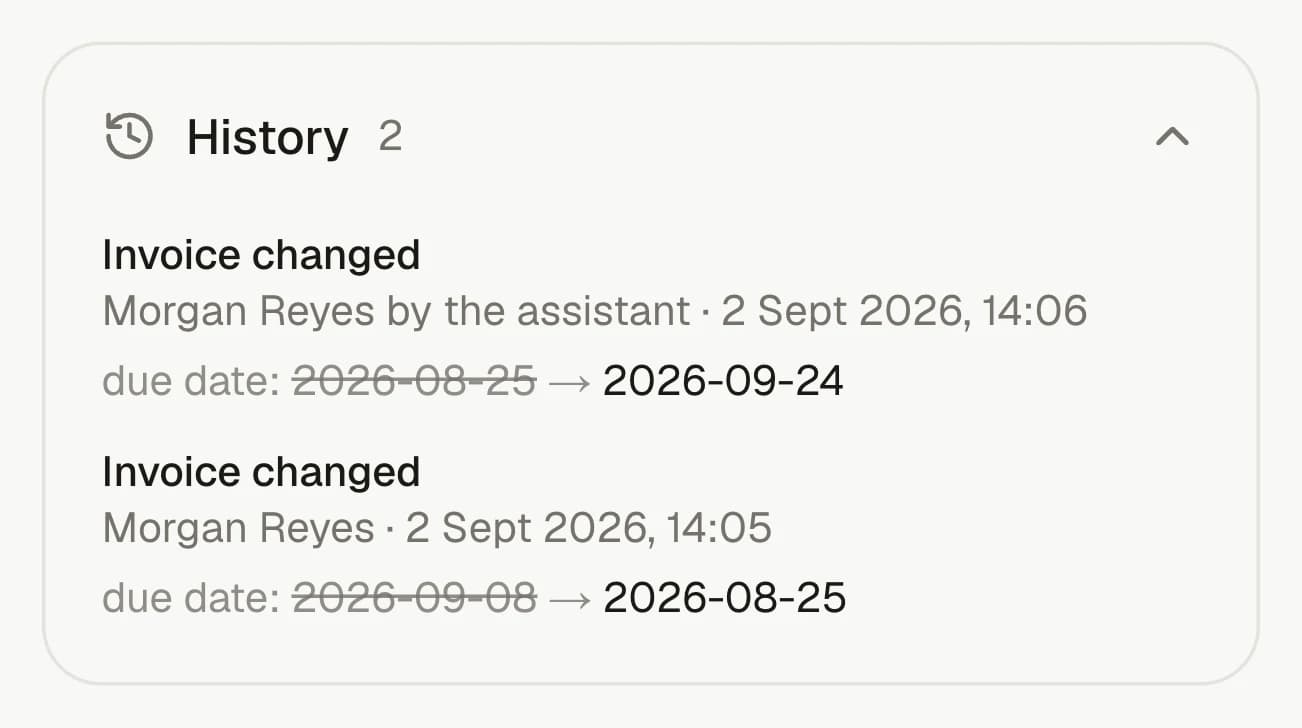
Every invoice, bill, contact and product carries its own history: who changed it, when, and whether it was a person, the assistant or a connected app. On Complete each entry also lists the fields that moved and what they were before.

The History panel on an invoice in invoiso, listing two changes — one made by a person and one by the assistant — each naming the field that moved and what it was before.
See who changed a record and what they changed, whether it was a person, the assistant or a connected app.

From source record to answer

Open any total until you reach the documents behind it.

Reporting, project analysis, exchange rates and period controls all read the same records and respect the same accounting boundaries.

Availability

Complete

Part of

Understand and close the books

Try asking

  • Who changed this invoice?
  • What was this bill's amount before?

Frequently asked questions

How does this feature work?

Every invoice, bill, contact and product carries its own history: who changed it, when, and whether it was a person, the assistant or a connected app. On Complete each entry also lists the fields that moved and what they were before.

Which plan includes this feature?

Complete. The pricing page shows the current plan boundary and any usage allowances.

Can I use the invoiso assistant with this workflow?

Yes. The in-app assistant can work with the records available to your plan and previews changes before applying them. For example: “Who changed this invoice?”.