



One connected workspace
See the whole workflow.
Open any detail.
Create the invoice, capture the bill, match the payment and ask what changed without losing the record behind the answer. Explore the screens below or jump straight to a feature.
Source beside record
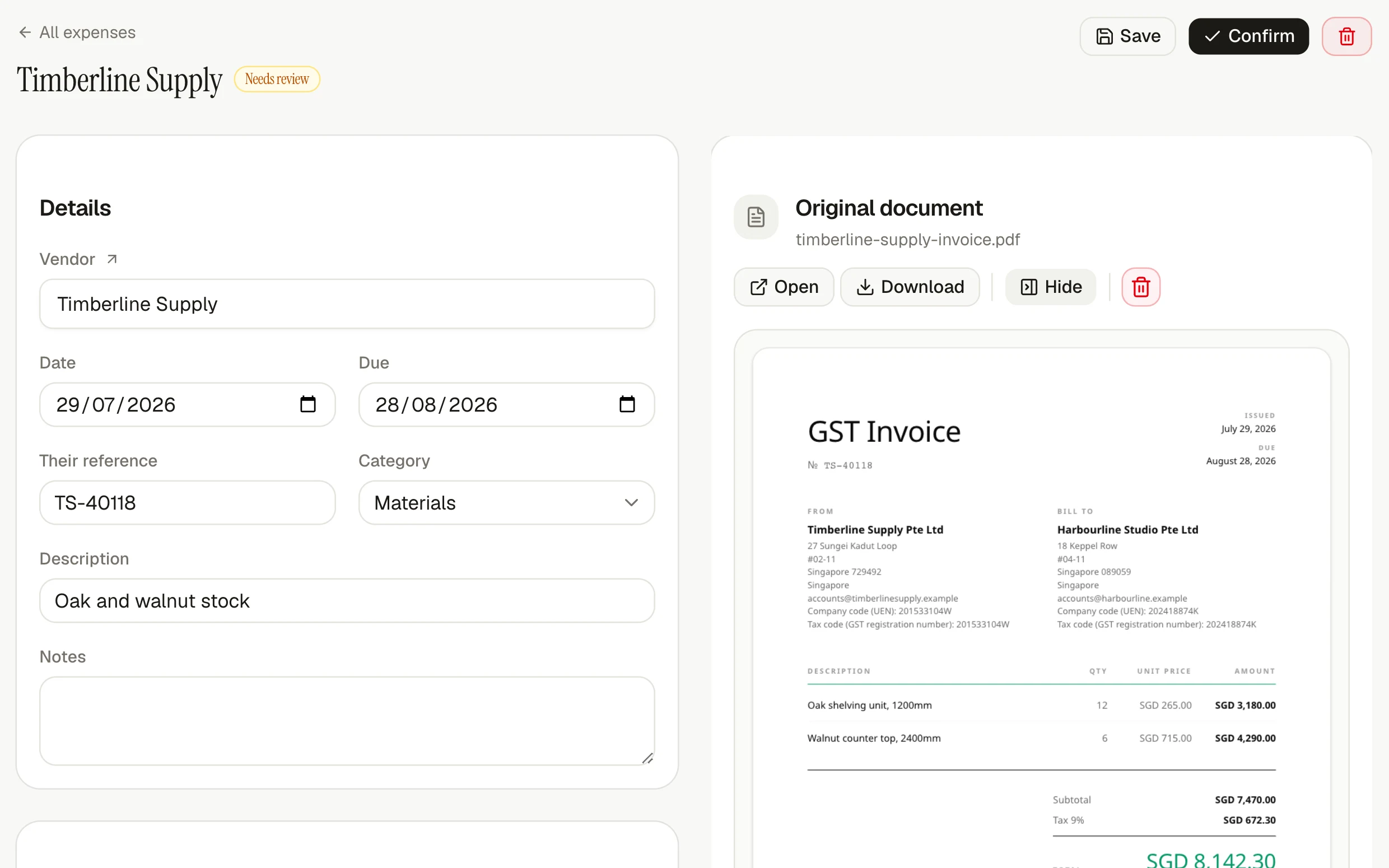
Review the expense beside the bill
Keep the supplier, dates, lines and total beside the original PDF, so every extracted value is easy to verify.
Explore the feature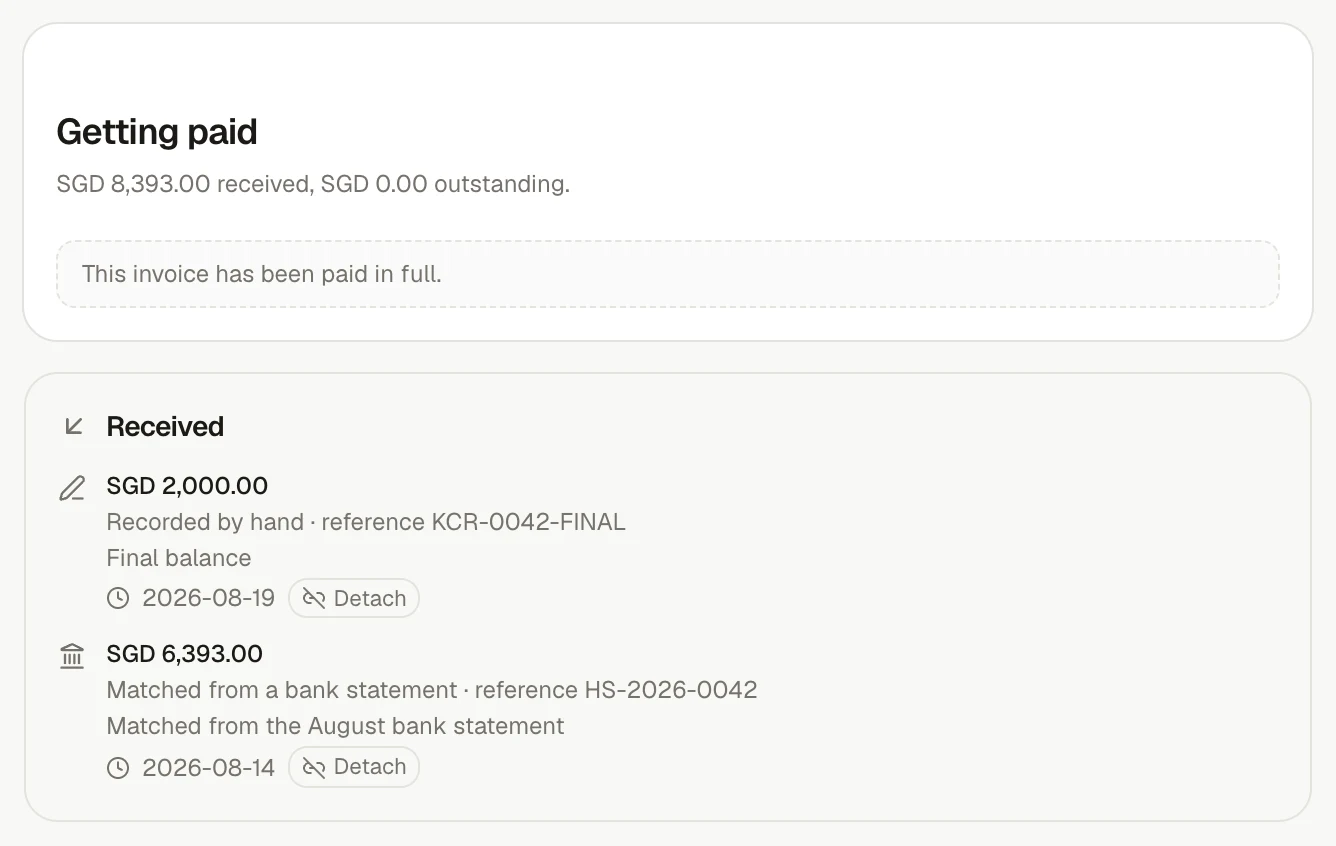
Payment trail intact
See exactly how the invoice was paid
Keep part payments, manual receipts and bank-statement matches together on the invoice they settled.
Explore the feature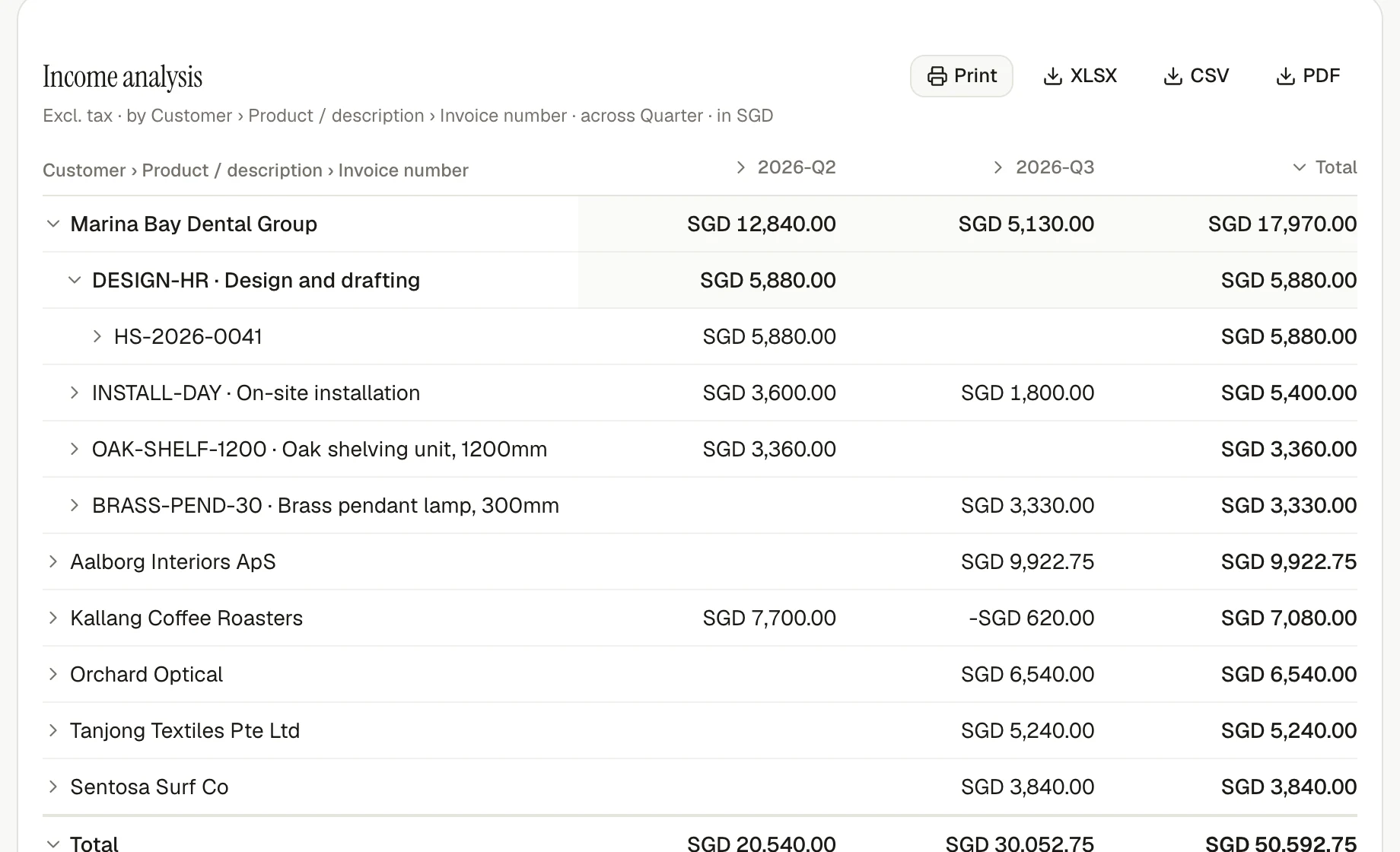
Reports out
Open the total. Keep the total.
Group and drill down while every subtotal and the overall result remain visible.
Explore reportingAll features
From first invoice to final answer.
Explore every part.
Each badge shows the first plan that includes the feature. Open a card to see how it works, where it fits and what it looks like in the product.
Invoice and get paid
No account is needed to create and download polished invoices. When you are ready to send and follow up from invoiso, emailing invoices and chasing payment start at Business.
Invoices that speak your customer's language
Create unlimited invoices with line-level tax, your own numbering and a live PDF preview. Work in 50 languages and 162 currencies. No account is needed to create and download a one-off invoice.
- Draft an invoice for 12 hours of design work at $150
- Duplicate last month's invoice to Acme and date it today
Credit notes that stay tied to the books
Correct a customer invoice with a linked credit note, or issue one on its own with a separate numbering sequence. Record supplier credit notes the same way so every report treats the value consistently.
- Credit note Acme for the two damaged units on INV-2026-0042
Recurring invoices that run on schedule
Schedule monthly or annual invoices as drafts, issued invoices or issued-and-emailed invoices. Each run creates an invoice only once; if delivery fails, the invoice stays issued with a clear retry action.
- Set up a monthly retainer for Acme at $2,400 from the 1st
Card payments, straight from the invoice
Add a card payment page to an invoice in any supported billing currency. Funds settle into your connected Stripe account, invoiso never holds them or takes a cut, and the invoice is marked paid when Stripe confirms payment.
- Send Acme a payment link for the outstanding invoice
Every way a customer can pay you, on one page
Put the right payment instruction on each invoice for where you and your customer are: a QR code for the payer's banking app — EPC GiroCode, PayNow, Pix, PromptPay, DuitNow, UPI, the Swiss QR-bill — a card page through your own Stripe account, or a bank transfer the payer approves at their own bank. The money goes to your account directly; invoiso never holds it. This page lists each method, where it works, whether it marks the invoice paid, and what it costs.
- Which payment methods can I offer a customer in Germany?
- Send Acme a payment link for the outstanding invoice
A QR code for the payer's banking app, drawn to their country's standard
One scan settles the invoice with the amount and reference already filled in. invoiso draws EPC GiroCode across the SEPA countries, the Swiss QR-bill, PayNow, Pix, PromptPay, UPI and DuitNow QR from your own account details. The money goes to your account, with nothing charged by invoiso and no percentage taken.
- Put a PayNow QR on the invoice for Harbourside
- Which QR code can a customer in Brazil scan?
PayNow QR, ready on the invoice
Singapore invoices can include a PayNow QR addressed to your UEN for the exact amount. It follows the EMVCo specification, carries no percentage fee, and settles directly into your bank account.
Explore the featureInvoice designs that look like your business
Choose a classic, letterhead, compact or banded layout, then add your logo, typeface and one of six accent colours. The design carries across every invoice, including scheduled ones, and handles long names, extra pages and non-Latin text.
- Which invoice design am I using?
- Show me last month's invoice
Send the invoice. Chase it automatically.
Email an invoice when it is issued, customise the message and copy your bookkeeper automatically. Schedule reminders before, on and after the due date while every attempt and delivery status stays on the invoice. Optional open tracking uses a one-pixel image, so treat an open as a signal rather than proof.
- Email invoice INV-2026-0042 to Acme
- Has invoice INV-2026-0042 been sent yet?
Signatures without print-and-scan
Place signature and date fields on a PDF, send it for signature and receive a signed copy with a completion certificate. Limits count documents, not signers. On Free, you share the signing link yourself; paid plans can email it for you.
- Free:
- 5 a month
- Business:
- 50 a month
- Complete:
- Unlimited
- Send the engagement letter to Priya for signature
Capture incoming documents
Turn bills and receipts into structured expenses while keeping the original source close for review. Bring them in as PDFs, photos or straight from your mailbox.
Drop in a bill. Get a reviewable expense.
Upload a photo or PDF and invoiso classifies it, reads the supplier, date, tax and total, then files an expense for review. If one PDF contains several invoices, each becomes its own record.
- File this receipt as an expense
- Why did my last document upload fail?
See every line, not just the total
Every plan reads the supplier, date, tax and total needed to file a bill. Detailed reading also captures each item, quantity, unit price and matching product, turning the source document into reportable line data.
- What did I actually buy from that supplier last quarter?
Verify bank details. Build the payment file.
Review bank details read from each bill, save confirmed accounts to the supplier and export selected unpaid bills as an ISO 20022 payment file. Changes and missing details are flagged before download; invoiso never guesses account details or moves money.
- Has any supplier's bank account changed?
- Build a payment file for the bills due this week
Bills filed as they reach your mailbox
Connect a mailbox and supplier bills are read and filed as they arrive, with nothing to upload. Access stays read-only and bounded per run, and invoiso tells you when the connection needs renewing.
- What arrived from your mailbox this week?
Bills filed as they land in a Google Drive folder
Choose a folder in Google Drive and every new document saved into it, or into any folder inside it, is read and filed. Access is read-only, nothing outside the folder is downloaded, and invoiso tells you when the connection needs renewing.
- What came in from the Drive folder this week?
An address to forward bills to
Every workspace gets its own invoiso address. Forward a supplier's bill to it and the attachment is read and filed exactly as a drag-and-drop upload would be, with the sender recorded as the person who submitted it. Mail is accepted only from addresses on your account. Anything else is set aside on a list in invoiso, where you can see who sent it, what the message was called and what was attached, and choose to trust that address or block it. The attachment itself is never downloaded, so an unknown sender costs nothing and reaches nothing. Everyone whose documents are filed gets one email back listing what was read — one message per delivery, not one per attachment.
- What is my workspace's email address for bills?
- What mail is being held, and why?
Set the line between suggestion and action
Choose one of four autonomy levels for each area: read, propose, act on clear cases or act on everything. Document controls are available on every plan, and the setting you choose is the rule the product enforces.
- Reconciling bank statements unattended: starts on Business.
- What is invoiso allowed to do without asking me?
Match money to records
Match money entering or leaving the bank to the invoice, bill or credit note behind it, without guessing when the evidence is unclear.
What the business owes its own people
When a bill says it has already been paid — a PAID stamp, a card slip, a zero balance — invoiso asks who paid it. Anything somebody paid for out of their own pocket is money the business owes them: totalled per person on their contact card and in a report, listed on the expenses that are waiting, and cleared when you record paying them back. No bank statement will ever show this debt, which is why it has to be kept somewhere.
- Who is owed money for bills they paid themselves?
- Mark Priya as paid back
Nothing reaches the books without the people you name
Write rules about which documents need signing off and by whom — who filed it, which supplier, which category, how it arrived, over an amount. A document a rule names cannot be confirmed or issued until everybody the rule names has agreed, and one rejection sends it back with a reason. Nobody approves their own work, ever. Where two rules cover the same document, everybody both rules name is asked. A document no rule names needs no approval, so switching this on holds nothing up until you write the first rule — and an owner can put one through without its approvals, with a reason that stays on the record for good. A document no rule names can still be sent to particular people by name: everybody named has to agree, a confirmed bill goes back into review until they do, and nothing inside a closed period can be sent.
- What is waiting for my approval?
- Why has the Sungei bill not been confirmed?
- Ask Priya and Morgan to approve the Halden Freight bill
Match bank activity without guessing
Import CSV, MT940, CAMT.053 or PDF statements. invoiso matches money in to open invoices and money out to unpaid bills, then asks you to confirm. When two records fit equally well, it shows the ambiguity; overlapping imports are safely deduplicated.
- Import this bank statement and match what you can
- How much is still owed to me?
Connect your bank. No more statement downloads.
Link a business account at your bank. Its transactions go into the same matching queue a statement upload feeds, deduplicated against anything you imported by hand, and the accounts your bank reports become the company's own bank accounts in invoiso. You log in at the bank, never here; access lasts as long as your bank allows and can be withdrawn at any time.
- How much came in from customers through the bank last month?
- Which lines from the bank are still unmatched?
Know what you owe — and what is overdue
Record full or partial supplier payments, including payments in another currency or against a credit note. Outstanding balances and ageing update from each bill's due date; a bill without a due date remains owed without being marked late.
- What do I owe suppliers this month?
Start with what you are owed, and what you owe
Import your customers and suppliers from a spreadsheet or your old system, with every unpaid invoice and bill. Columns are recognised by their names, and a contact you already have is matched rather than doubled. Each unpaid amount becomes an opening balance: it counts in what you are owed and what you owe from the first day, ages from its own due date and settles when the payment arrives, but it is never counted again as revenue or spend, and invoiso does not send or remind anybody about it.
- Import this customer list with what each of them still owes
- How much was owed to us when we started using invoiso?
Track stock and landed cost
Know what you hold, where it sits and what it truly cost after freight, duty, transfers and returns.
During early access, assisted Shopify custom-app setup is included with annual Complete for the first 10 businesses. Email support@invoiso.com to reserve a place or discuss another setup. Amazon, Etsy and other sales-channel integrations are planned.
Stock value built from real movements
Purchases move stock in and sales move it out. Quantity and value are replayed from that history instead of stored as a number to overwrite, so switching between FIFO, LIFO and weighted average rewrites nothing.
- What stock do I hold, and what is it worth?
- Which products were sold without any stock behind them?
Put freight and duty into true stock cost
Attach a shipping or customs bill to the purchases it belongs to, then allocate the cost by value, quantity, weight or volume. Because the allocation is recalculated from the source records, correcting the bill also corrects stock value.
- Spread this freight bill across the shipment by weight
Know exactly where your stock sits
Track stock separately across offices, warehouses and shops. Each movement records its location, so sales draw cost from the stock actually held there, while reports can show one location or the whole business. Businesses with a single location can leave this off.
- How much of this do we have in the Manchester shop?
- What is the whole business holding, across every location?
Units that calculate correctly
Give each unit a measure such as each, mass, volume or length. invoiso can then combine kilograms with grams correctly and allocate landed costs only across compatible quantities.
Explore the featureReturns that restore the right stock value
Choose whether a credit note also returns stock. The returned unit uses its cost from inventory history, so a goodwill refund does not rewrite what the goods originally cost.
Explore the featureUnderstand and close the books
Follow every total back to the records beneath it, report in one currency and protect completed work when a period closes.
One dashboard, backed by the records
See income, spending, outstanding balances and overdue amounts, all calculated from the records underneath and consolidated into one reporting currency.
- How much did I invoice last month?
Reports that let you keep asking why
Build reports for income, expenses, receivables, payables and stock at any past date. Group and drill down independently by customer, supplier, category, product or period while totals stay visible. Compare net, VAT/GST and gross side by side.
- Show me income by customer by quarter this year
- What did I spend the most on this quarter?
See who changed what, and when
Every invoice, bill, contact and product carries its own history: who changed it, when, and whether it was a person, the assistant or a connected app. On Complete each entry also lists the fields that moved and what they were before.
- Who changed this invoice?
- What was this bill's amount before?
See profit by project, department or site
Split invoice and bill lines across projects, departments or sites by amount or percentage. Review income, expenses and shared budgets at any level, while unassigned amounts stay visible as Unallocated. Splits never change document totals, tax or exports.
- Split this bill 60% to Marketing and 40% to Sales
- Show me income and expenses by department this quarter
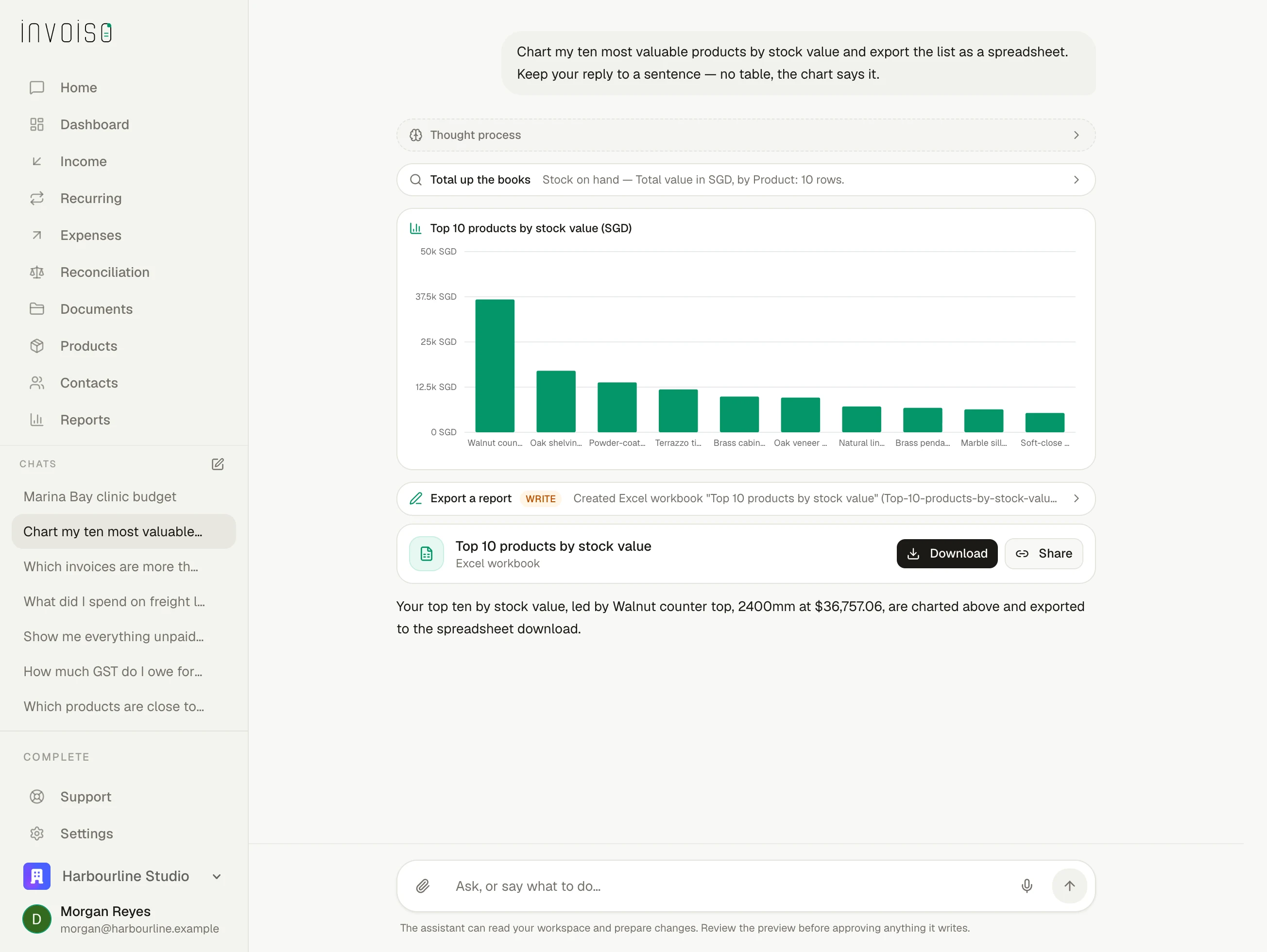
Turn answers into charts, sheets, slides and PDFs
Turn an answer into an inline chart, spreadsheet, slide deck, PDF or CSV. Every format uses the same result, so the downloaded figures match the conversation.
- Chart my income by month and put it in a spreadsheet
- Make me a two-slide summary of this quarter
Use the exchange rate from the right date
Convert documents using European Central Bank rates pinned to the document date, not today's rate. Future-dated documents use the latest available rate, then repin when their date arrives.
- What was that EUR invoice worth in SGD on the day I issued it?
Close the period — and keep it closed
Set how far back the books are complete and nothing can write behind that line — not you, the assistant or an automated run. The boundary moves forward automatically instead of relying on someone to remember.
- Are my books closed for last quarter?
One workspace for you and your bookkeeper
Give everyone working on the books access to the same records instead of emailing exports around. Remove someone once and their access disappears across the workspace.
Explore the featureExport to accounting
Push invoices and expenses to your accounting software with tax codes mapped once. invoiso shows missing information before anything is sent, rather than handing the problem back as an error afterwards.
Works with Xero and QuickBooks Online.Explore the featureApply local tax rules
Work in 50 languages and 162 currencies, with exchange rates pinned to each document date. Country profiles add local tax categories, dated rates and registration rules for 46 countries; elsewhere, invoiso keeps the workflow neutral.
Send and receive e-invoices over Peppol
Send your invoices straight into your customer's system over the Peppol network, and take your suppliers' e-invoices straight into invoiso. Many countries work as soon as you switch e-invoicing on; for the rest it is one button in Settings to ask us, and we come back to you. Sending and receiving are both the e-invoicing add-on. Every document sent or received counts as a transaction: the add-on includes a monthly number of them, and beyond those each one draws on your usage balance. Outbound documents are validated before they leave; inbound documents wait for review instead of being trusted automatically.
Explore the featureTax categories and dated rates for your country
Apply the local tax treatment to each invoice line. Standard and reduced rates follow the invoice date, and you can enter a manual rate for exceptions.
Explore the featureSingapore GST, built around PINT-SG
Use all 14 PINT-SG tax categories, with UEN and GST registration modelled separately. Readiness checks advise while you draft and become mandatory before transmission.
Explore the featureYour InvoiceNow date, worked out and remembered
Enter your GST status and supplies band and invoiso estimates your phase of the IRAS requirement, then reminds you before it begins. If IRAS gives you a date directly, that date replaces the estimate.
Explore the featureWork with AI
Ask questions or request work in plain language. On every plan, the assistant can do the same work you can do in the workspace, and asks before it sends, deletes or sets up anything recurring.
Ask AI to do the work — not just explain it
Use plain language across invoices, expenses, contacts, products, stock, bank statements, recurring schedules and settings. The assistant can do the same work you can do in the UI, asks before it sends, deletes or sets up anything recurring, and still respects closed periods.
- What can you help me with?
- Who are my biggest customers this year?
Bring invoiso into ChatGPT or Claude
Connect ChatGPT or Claude to your invoiso workspace with the invoiso MCP URL, then sign in normally — no API key needed. Every plan can read records; Business and Complete can also create, update and delete them. API keys remain available for scripts and clients that cannot use OAuth. The in-app assistant can write on every plan.
Explore the featureStart free. Add automation as the work grows.
Every plan includes unlimited invoicing. Move to Business when you want invoiso to send and chase invoices, run recurring billing, take card payments, read documents in detail, manage stock, prepare supplier payment files and reconcile the bank. Complete adds automated mailbox capture, direct exports to Xero or QuickBooks, unlimited team access and higher allowances.
Each plan includes a number of documents read by AI, plus the assistant. When an allowance runs out, that part pauses — nothing beyond your plan is charged automatically and there is no limit to raise. To carry on, top up a balance and it is spent at 1.6×–1.8× what each answer or document actually costs us; when it runs out you top up again, or wait for the period to reset. You are never charged for a document we could not read or an e-invoice the network rejected — neither one counts.