Capture incoming documents
Business and up

Verify bank details. Build the payment file.

Review bank details read from each bill, save confirmed accounts to the supplier and export selected unpaid bills as an ISO 20022 payment file. Changes and missing details are flagged before download; invoiso never guesses account details or moves money.

An invoiso supplier's confirmed bank accounts, including one since retired.
Review what was paid, what remains and the evidence attached before preparing the next payment.

From source to trusted record

Automate the reading. Keep the evidence visible.

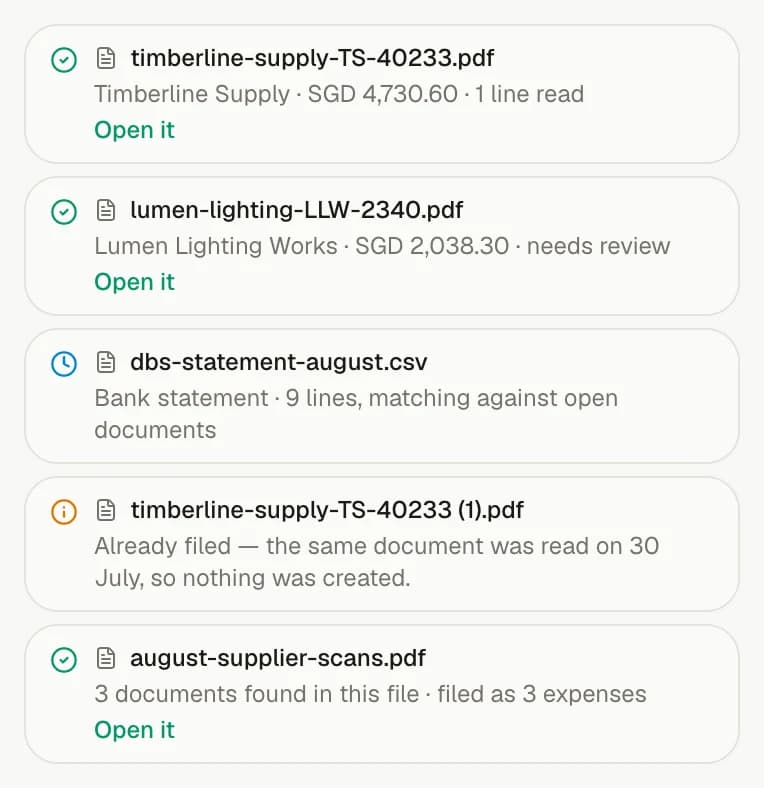
Incoming documents become structured records while the original file stays close enough to verify what was read and correct anything that needs attention.

Availability

Business and up

Part of

Capture incoming documents

Try asking

  • Has any supplier's bank account changed?
  • Build a payment file for the bills due this week

Frequently asked questions

How does this feature work?

Review bank details read from each bill, save confirmed accounts to the supplier and export selected unpaid bills as an ISO 20022 payment file. Changes and missing details are flagged before download; invoiso never guesses account details or moves money.

Which plan includes this feature?

Business and up. The pricing page shows the current plan boundary and any usage allowances.

Can I use the invoiso assistant with this workflow?

Yes. The in-app assistant can work with the records available to your plan and previews changes before applying them. For example: “Has any supplier's bank account changed?”.